
Download the latest version of the program 0.6.1.1 :
Installer (suggested version):
| File | Name | Variant | Size |
|---|---|---|---|
 | RigAndLogInstaller.exe | online installer | ~ 10 MB |
Total downloads: 1,423
Please read the installation guide before downloading.
The program can also be run on Linux — see: Description of installation and configuration in Linux.
List of changes:
- Due to Windows security policies, automatic updates require manual user interaction.
- Added USB Hub to manage other programs with WSJTX/JTDX see details
- Improved support for free QRZ accounts (see the QRZ description).
- Added support for HRDLog and ClubLog
- Simplified and improved QSO upload functions to external services
- (QRZ, LoTW, HRDLog, ClubLog)
- User interface improvements – the number of options has been reduced and is no longer overwhelming
- Improved integration with WSJT-X / JTDX
- Improved ADIF export – file name format can now be selected
- Improved QSL editor – card thumbnails are now displayed when opening
- Improved support for selected TRX radios via OmniRig
(additional .ini files included in the ZIP package – OMNIRIG folder) - Added support for HAMLIB libraries
- Improved application startup on Linux via Wine
- Enhanced map handling on Linux and Windows 7
- Improved UI appearance and fixed various minor issues
Due to a number of fixes and new modules, it is recommended to make a backup copy of the program before installation.
Portable version (ZIP packgage) – for advanced users.
| File | Name | Variant | Size |
|---|---|---|---|
 | RigAndLog_Portable_x64_0.6.1.1.zip | 64 bit | ~ 10 MB |
| RigAndLog_Portable_x86_0.6.1.1.zip | 32 bit | ~ 10 MB |
ℹ️ Windows may mark a downloaded ZIP file as originating from the Internet.
If you see security warnings when extracting or running the application, right-click the ZIP file → select Properties → check “Unblock”, and then extract it again. Click here to view detailed instructions.
⚠️ Installation:
You can choose the online installer (RigAndLogInstaller.exe), which will automatically select the appropriate version and install program for you.
The installer requires:
- An active internet connection
- Microsoft .NET Framework 4.7.2
During download, your browser or antivirus software may display warnings. This is normal for amateur radio software. These are freeware projects that are not digitally signed (code-signing certificates are expensive). On an internet-wide scale, they are niche applications that are downloaded relatively rarely, so Windows does not have established reputation data for them — which may result in warnings.
⚠️ RigAndLog is not digitally signed, as it is a non-commercial project. The cost of maintaining a code-signing certificate would be disproportionate to the nature and scale of this project.
The program occupies approximately 30 MB of disk space, plus additional space for user data such as QSO records and log files.
After downloading file version and before running/unpacking, it is a good idea to mark that the file does not come from the Internet.
- Find the downloaded file.
- Click with the right mouse button.
- Find the Properties option.
- Let’s check Unlock.Click on Apply.
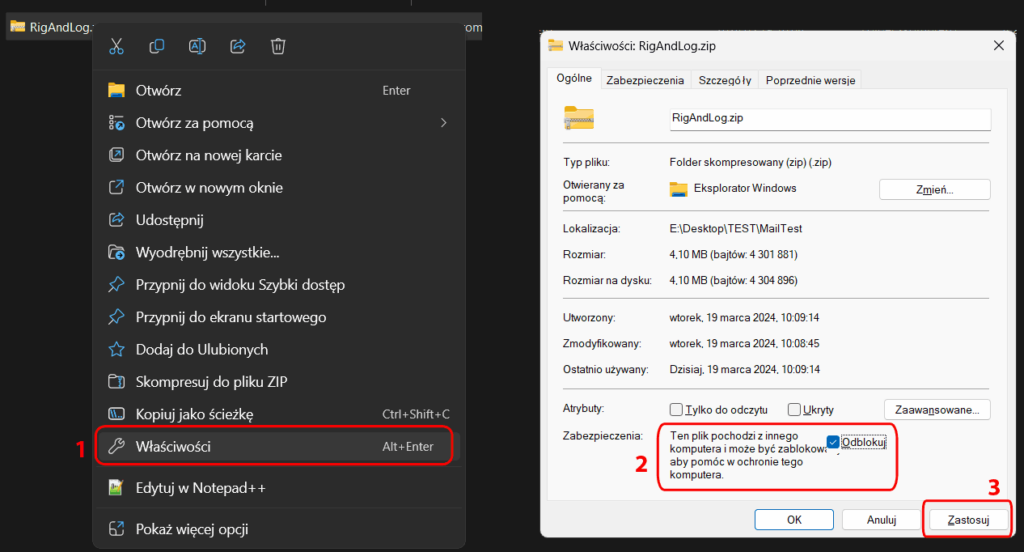
Photo in Polish. Unfortunately, I didn’t have an English version of Windows available.
Then we can unpack the program anywhere. The only requirement is that the program has the ability (permissions) to write to its directory in order to save the configuration.
Now you can run it by clicking the RigAndLog-SP4THK.exe file
If .NET is not installed, a window will appear asking you to install it. If it does not appear, you need to manually install .NET 4.7.2.
If we download the installer, after downloading it, Windows will block the attempt to run it. You need to unlock the file. You can do it like with a zip file, but if you run it, a window may appear:
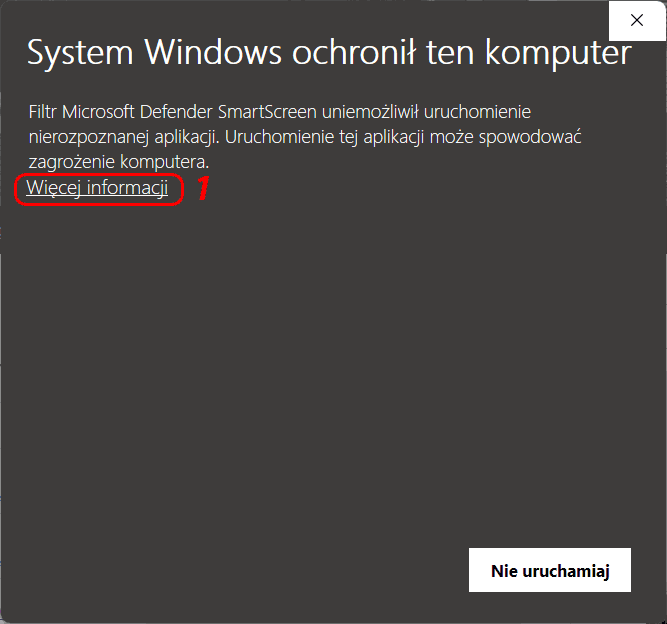
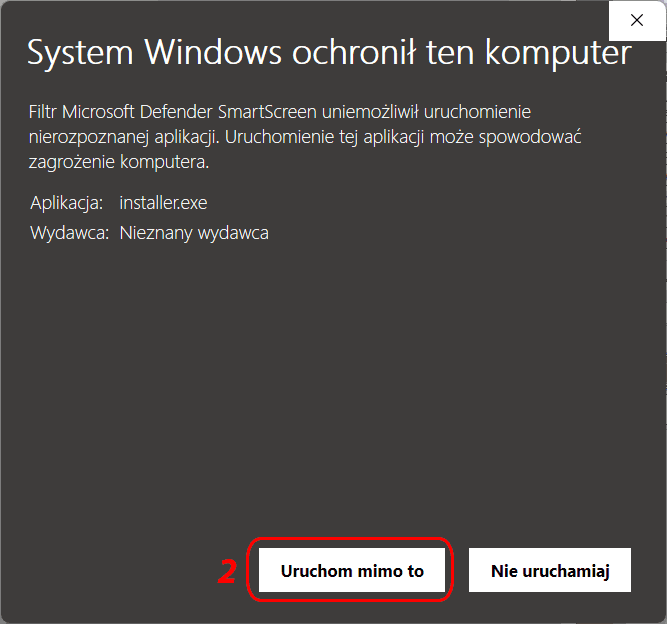
Photo in Polish. Unfortunately, I didn’t have an English version of Windows available.
🛠️ Windows 11 – RigAndLog startup blocked (Smart App Control)
On some Windows 11 systems, RigAndLog may be blocked at startup and display an application protection message.
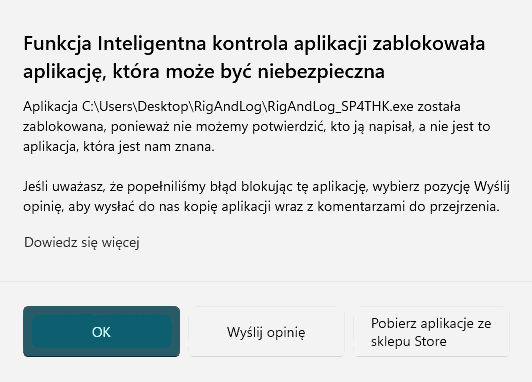
This is caused by the Smart App Control feature.
✅ How to run RigAndLog – step by step
1️⃣ Open Windows security settings
Settings → Privacy & security → Windows Security
2️⃣ Open app protection settings
Select App & browser control
3️⃣ Turn off Smart App Control
Click Smart App Control and set it to Off
4️⃣ Run RigAndLog again
After disabling this option, the program will start normally.
ℹ️ Important information
- Your system is still protected by Windows Defender and SmartScreen
- Only the decision to run less popular applications is moved from the system to the user
- Many amateur radio applications are not digitally signed — this is normal
⚠️ Note: Once Smart App Control is turned off, it cannot be enabled again without reinstalling Windows.
🔎 Why does Windows block it?
Smart App Control blocks new or niche applications that are not digitally signed.
This does not mean the application is unsafe — only that it is not yet well known to the system.
Submitting an application to Microsoft does not result in a permanent unblock.
For unsigned applications, the system may block each application launch, regardless of the version.
⚠️ RigAndLog is not digitally signed because it is a non-commercial project, and the cost of maintaining a code-signing certificate would be disproportionate to the nature and scale of the project.
📻 Omnirig
To ensure full functionality, you can install Omnirig by downloading from here: https://www.dxatlas.com/omnirig/. However, this is not required if we want to use LogBook itself.
⚠️ Attention:
If you work in a split or use two VFOs A/B, the omnirig has control errors. In the OMNIRIG folder of the program, I have included two sample INI files to be uploaded to the omnirig program folder, e.g.: c:\Program Files (x86)\Afreet\OmniRig\Rigs\, which somewhat correct this inconvenience. Unfortunately, I cannot correct files from all devices and this is not possible for every device.
The program is what it is, errors, poor operation, damage, etc. etc. … obviously the author is not responsible.
The program is free for any use, but: Maybe you can buy me a coffee ?
ADDS:
1. Omnirig: https://www.dxatlas.com/omnirig/
2. Hamlib: https://sourceforge.net/projects/hamlib/
3. Chromium Map Add-on
If you are using Windows 7, Linux, or a non-standard system configuration, you can install an additional component to enable map functionality.
Download the ZIP file and extract it directly into the application folder.
All required folders are already included in the archive — no manual setup is needed.
| File | Name | Variant | Size |
|---|---|---|---|
| mapChromium.zip | 64/32 bit | ok 110 MB |
Tom SP4THK