
Download the latest version of the program 0.7.1.4 :
Installer (suggested version):
| Plik | Nazwa/Link | System | SHA256* |
|---|---|---|---|
 | Windows x64 - .NET 8 (zalecane) | Windows 10/11 | SHA256 |
| Windows ARM64 - .NET 8 | Windows ARM | SHA256 |
| Windows x86/x64 - .NET 4.7.2 | Windows 7 lub nowszy | SHA256 |
* SHA256 – checksum used to verify the integrity of the downloaded file.
Total downloads: 1,831
Don’t know which version to choose?
If you use a regular computer, choose Windows x64 – .NET 8.
If you have a computer with an ARM processor, choose Windows ARM64 – .NET 8.
For older computers, choose Windows x86/x64 – .NET 4.7.2.
Please read the installation guide before downloading.
The program can also be run on Linux — see: Description of installation and configuration in Linux.
In macOS, the program can be run using Parallels Desktop with a Windows virtual machine. Tested by Adam SP6DA.
List of changes:
- Fixed export errors. Please verify that the program fields are correct!!!
- Major changes
- Numerous major changes and improvements have been introduced.
- New LogBook fields
- QRZ: You can now see in the list whether a QSO has been uploaded to QRZ and whether it has been confirmed by the other operator.
- eQSL: The QSL card upload status is now displayed. This status can be synchronized with QRZ.
- Programs (POTA, SOTA, etc.)
- Support for up to 12 program fields.
- Simultaneous support for POTA, SOTA, LOTA, IOTA, WWFF and custom programs.
- Additional fields can be expanded using the ▼ button.
- After updating, it is recommended to review the Programs tab in the configuration.
- Templates
- Changes to program handling may require updating your custom templates.
- QSL Manager
- Viewing previously sent QSL cards.
- Adding received QSL cards.
- Work is ongoing on a central QSL Manager.
- QRZ
- Improved integration with the QRZ service.
- Added information about:
- QSO confirmation,
- eQSL upload status.
- Existing entries can now be updated.
- Performance
- Faster startup time.
- Numerous stability and performance improvements.
Due to the number of fixes and new modules, it is strongly recommended to make a backup of the program before installation!!!
Portable version (.7z packgage) – for advanced users.
| File | .7z | System | SHA256* |
|---|---|---|---|
 | Windows x64/ARM64 portable - .NET 8.0 | Windows 10/11/ARM 64bit Linux/MacOS(parallers) | SHA256 |
| Windows x86/x64 portable - .NET 4.7.2 | Windows 7+ 32 and 64 bit Linux | SHA256 |
* SHA256 – checksum used to verify the integrity of the downloaded file.
**When using Linux or a non-standard system configuration, the map functionality requires an additional program, which can be downloaded separately from this link.
You do not need to do this when using Windows natively or through Parallels in the standard configuration.
ℹ️ Windows may mark a downloaded package file as originating from the Internet.
If you see security warnings when extracting or running the application, right-click the ZIP file → select Properties → check “Unblock”, and then extract it again. Click here to view detailed instructions.
⚠️ Installation:
You can choose the online installer (RigAndLogInstaller.exe), which will automatically select the appropriate version and install program for you.
The installer requires:
- An active internet connection
- Microsoft .NET Framework 8.0 or 4.7.2 (depednds of installation version).
During download, your browser or antivirus software may display warnings. This is normal for amateur radio software. On an internet-wide scale, they are niche applications that are downloaded relatively rarely, so Windows does not have established reputation data for them – which may result in warnings.
The program occupies approximately 30 MB of disk space, plus additional space for user data such as QSO records and log files.
After downloading file version and before running/unpacking, it is a good idea to mark that the file does not come from the Internet.
- Find the downloaded file.
- Click with the right mouse button.
- Find the Properties option.
- Let’s check Unlock.Click on Apply.
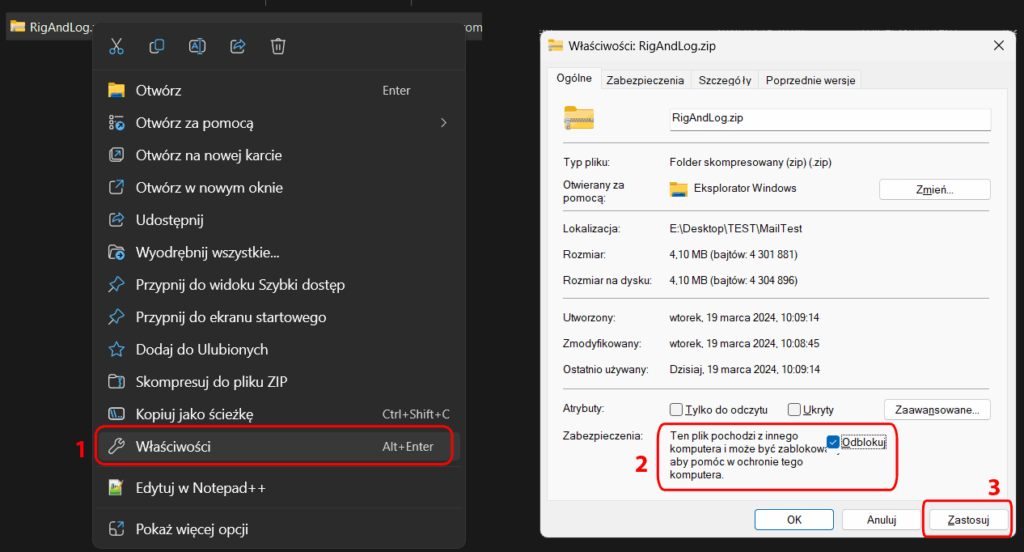
Photo in Polish. Unfortunately, I didn’t have an English version of Windows available.
Then we can unpack the program anywhere. The only requirement is that the program has the ability (permissions) to write to its directory in order to save the configuration.
Now you can run it by clicking the RigAndLog-SP4THK_Core.exe file
If .NET is not installed, a window will appear asking you to install it. If it does not appear, you need to manually install it
📻 Omnirig
To ensure full functionality, you can install Omnirig by downloading from here: https://www.dxatlas.com/omnirig/. However, this is not required if we want to use LogBook itself.
⚠️ Attention:
If you work in a split or use two VFOs A/B, the omnirig has control errors. In the OMNIRIG folder of the program, I have included two sample INI files to be uploaded to the omnirig program folder, e.g.: c:\Program Files (x86)\Afreet\OmniRig\Rigs\, which somewhat correct this inconvenience. Unfortunately, I cannot correct files from all devices and this is not possible for every device.
The program is what it is, errors, poor operation, damage, etc. etc. … obviously the author is not responsible.
The program is free for any use, but: Maybe you can buy me a coffee ?
ADDS:
1. Omnirig: https://www.dxatlas.com/omnirig/
2. Hamlib: https://sourceforge.net/projects/hamlib/
3. Chromium Map Add-on
If you are using Windows 7, Linux, or a non-standard system configuration, you can install an additional component to enable map functionality.
Download the add-on file and extract it directly into the application folder.
All required folders are already included in the archive – no manual setup is needed.
| File | Name | Version | Size |
|---|---|---|---|
| mapChromium_Net8.0-x64.7z | 64bit | ~ 110 MB |
| mapChromium_Net8.0-ARM64.7z | ARM64 | ~ 110 MB |
| mapChromium_Net4.7.2.7z | 32/64 bit | ~ 110 MB |
Tom SP4THK